> For the complete documentation index, see [llms.txt](https://citemed-io.gitbook.io/citemed.io-documentation/llms.txt). Markdown versions of documentation pages are available by appending `.md` to page URLs; this page is available as [Markdown](https://citemed-io.gitbook.io/citemed.io-documentation/abstract-reviewing/the-1st-pass-abstract-review-screen.md).
# The 1st Pass Abstract Review Screen
Your review begins with the ‘1st Pass’ or abstract screening. This is performed on the ‘1st Pass - Unclassified’ Menu Screen.
The screen will look like the following (Note you can switch between Table and Board Views.
The table view:
The board view:
### Performing Your Abstract Review
The intention of this view, is to allow the user to **exclude as many abstracts quickly.** If you see an abstract that is likely to be included in your final review, simply skip it.
### Quick Exclude Abstract (No Comment)
To exclude an abstract from this view, simply select the ‘Exclusion Reason’ from the Dropdown, and click ‘Exclude’.
Recognize these reasons? If you want to change your available exclusion reasons, make sure you read the documentation on [exclusion reasons. ](/citemed.io-documentation/protocol-set-up/define-exclusion-reasons.md)
### Quick Exclude Abstract (With a Custom Comment)
Sometimes, you may want to add some more detail beyond the standard exclusion reason to a particular abstract. You do this by **Excluding with a Comment, and click the comment bubble that’s inside the Exclude Button**
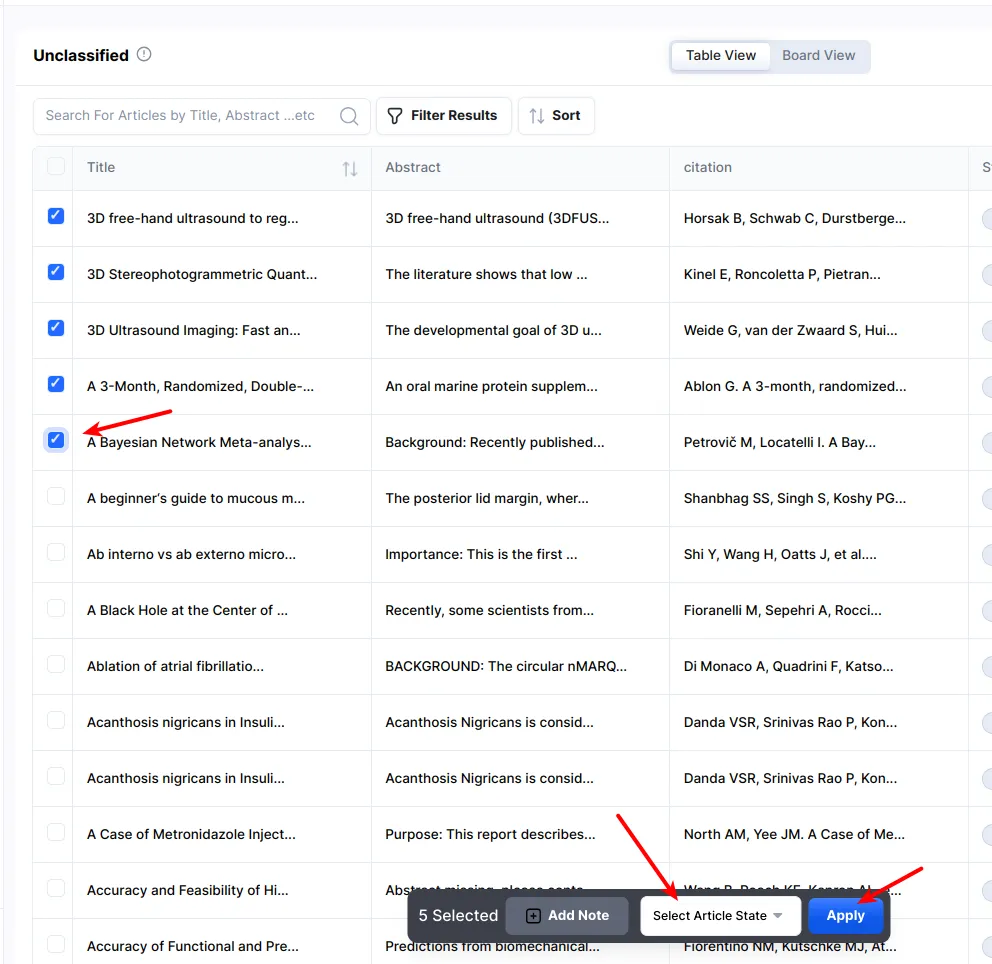
### Bulk Action on Articles
If you want to update the state on multiple articles at once, you can:
* Select all the articles to change
* Update the state on the bottom menu
* Click ‘Apply’